 川流不息
Wi-Fi Direct was introduced by the WFA (Wi-Fi Alliance) in 2009, and the latest specification is currently v1.2. Its goal is to let two or more Wi-Fi devices exchange data at high speed with each other without a Wi-Fi access point. Communication is entirely based on TCP/IP, which makes it very friendly for developing Wi-Fi Direct applications.
Introduction
When it was first proposed, Wi-Fi Direct was called Wi-Fi Peer-to-Peer, so it’s also known as Wi-Fi P2P. Its main competitor is Bluetooth. Today each has its own strengths: Bluetooth has a clear advantage in power consumption, while Wi-Fi Direct is far ahead in transfer speed and range. I expect the two will coexist in our smart devices for a long time.
It’s also worth noting that Wi-Fi Direct is only a data-link-layer protocol and doesn’t include network- or application-layer specifications, so the thing people care about most — how to transfer files — is outside its scope. Wi-Fi Direct only establishes a link between two or more devices over Wi-Fi; how files are transferred is up to each application. That’s why stock Android doesn’t ship an app for transferring files over Wi-Fi Direct, and for now you have to use third-party apps.
Some say SoftAP can also connect two or more devices. That’s true — Wi-Fi Direct itself uses both SoftAP and station functionality. Wi-Fi Direct just makes connecting devices much easier: a single tap on each side is enough, and in some cases a tap on just one device will do, for example when connecting to a Wi-Fi Direct printer or a Wi-Fi Display device, which can respond to Wi-Fi Direct connection requests automatically.
So how does Wi-Fi Direct discover and connect so quickly? Looking at the protocol, it adds device discovery and group negotiation on top of Wi-Fi, so two devices can automatically negotiate their roles as needed and then connect using WPS. The whole process involves more than a dozen frame exchanges, which I’ll analyze in detail below.
Basic Concepts
Wi-Fi Peer-to-Peer: P2P for short, another name for Wi-Fi Direct P2P Device: a device that supports P2P; it’s called a P2P Device until group negotiation completes P2P Group Owner: GO for short, the P2P Device that becomes the SoftAP after group negotiation P2P Group Client: GC for short, the P2P Device that becomes a station after group negotiation
Flow Diagram
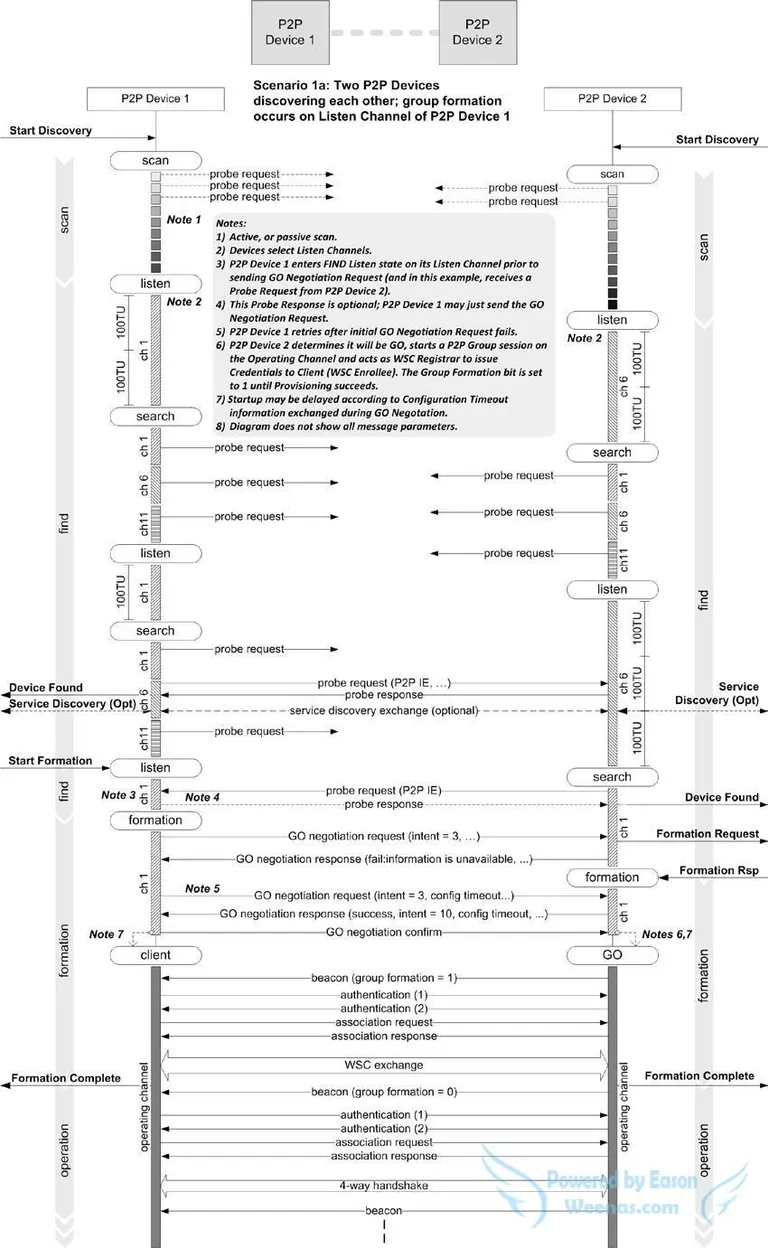
First, let’s look at the detailed Wi-Fi Direct connection flow. The diagram below covers most of Wi-Fi Direct’s functionality, including device discovery, group negotiation, authentication and association, WPS and the 4-way handshake.
Device Discovery
Device discovery is Wi-Fi Direct’s most important feature. It consists of two functions: scan and find. Scan quickly discovers existing GOs; note that it scans all channels. Find is split into two phases, search and listen, which alternate; the protocol recommends running find for two minutes. The search phase is similar to scan, except that it only scans channels 1, 6 and 11, and it checks whether received probe responses and beacons contain a P2P IE. In the listen phase the device listens on one of channels 1, 6 and 11 chosen at random, and responds to probe requests containing a P2P IE. Listening lasts n × 100 TU (time units); 802.11 defines 1 TU = 1024 µs, about 1 ms, and n is a random integer, so listen lasts roughly a multiple of 100 ms. The randomness ensures both sides can find each other: otherwise, if both happened to be searching and listening at the same time, they’d never see each other, whereas the random interval always lets them discover each other quickly.
Listen Channel
As mentioned, Wi-Fi Direct devices always scan and listen on channels 1, 6 and 11. The listen channel is picked at random when Wi-Fi Direct is turned on and stays fixed until it’s turned off. There are two ways to learn the other side’s listen channel: from the channel on which its probe response was received, or from the listen channel field in the P2P IE of its probe response. The second method is generally used, because some non-compliant P2P devices also reply with probe responses during the scan phase, in which case the first method would yield the wrong listen channel.
GO Negotiation
After discovering the other device, the next step is to tap it to connect, and the first step of connecting is deciding each side’s role: who becomes the GO and who becomes the GC. Wi-Fi Direct does this by adding an exchange of Action frames. The exchange is very simple, as shown below:
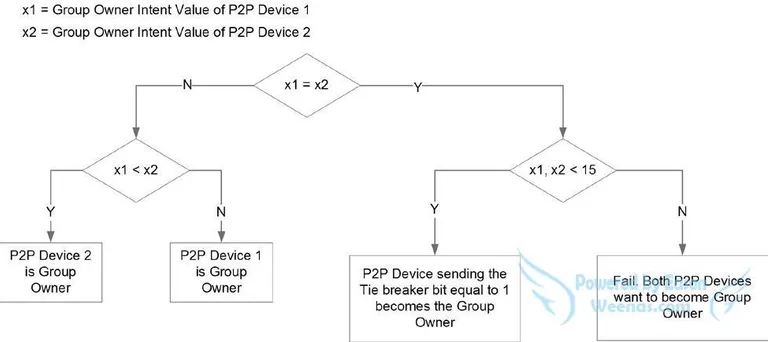
GO negotiation involves three types of Action frames: GO Req, GO Resp and GO Confirm. GO Req and GO Resp contain a GO Intent IE, an integer from 0 to 15, and comparing the two values decides the GO, as shown below. If the intents differ, the higher one becomes the GO. If they’re equal and less than 15, the Tie Breaker random bit in the GO Req decides: if it’s 1, the sender becomes the GO; otherwise the other side does. If they’re equal and both 15, GO negotiation fails — both A and B insist on becoming the GO and neither can compromise, so the only outcome is failure.
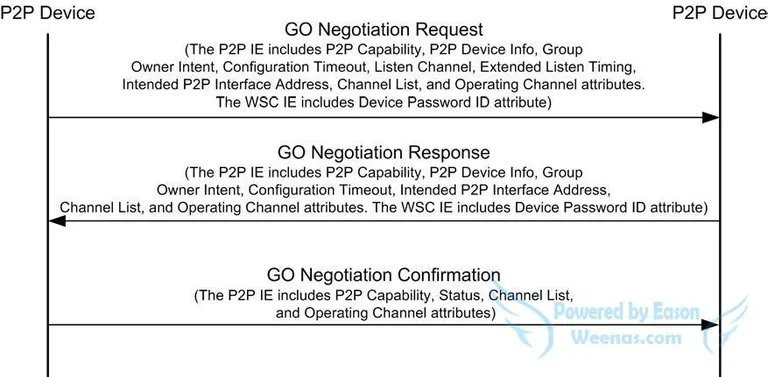
In practice GO negotiation usually involves five frame exchanges, as the P2P flow diagram clearly shows. It can be confusing at first, so here’s an example. Suppose there are two P2P devices, A (listen channel 1) and B (listen channel 11). On A’s P2P screen, the user taps B to connect. A starts sending GO Req on channel 11 and keeps sending for a while, because B may be in the search phase — at least longer than B’s search period. Only when B switches to listen does it receive the GO Req; it immediately replies with a GO Resp on channel 11 and notifies the upper-layer application, which asks the user whether to accept A’s connection. Note that the GO Resp B just sent has the status “fail: information is unavailable”; A takes no action on receiving it and keeps waiting. Once the user accepts on B, B sends its own GO Req. Since A initiated the connection, it doesn’t need to ask its user again and directly replies with a successful GO Resp. Finally B sends a GO Confirm to conclude the GO negotiation.
The WPS Flow
Wi-Fi Direct uses WPS PBC to negotiate keys. When a phone connects to an AP with WPS, you first press the WPS button on the AP, then the WPS button on the phone, and the two connect automatically. Pressing the AP’s WPS button actually sets a PBC flag in the WPS IE of its beacons for the next two minutes; the phone’s WPS button starts the WPS connection flow, which begins connecting and negotiating WPS keys if a scanned beacon carries the PBC flag.
Wi-Fi Direct skips the button presses: when the P2P device negotiated as GO switches into the GO role, it automatically adds the PBC flag to its beacons, and the GC automatically starts the WPS connection flow. There’s a hidden problem here: if an AP nearby happens to be in PBC mode, or several pairs of P2P devices are connecting at the same time, the GC may well see more than one AP with the PBC flag, triggering a PBC overlap error that makes the P2P connection fail. The chance is small, but it affects every device that uses WPS and deserves attention. P2P can of course avoid it by using the MAC address from the earlier GO negotiation to tell them apart.
The 4-Way Handshake
The WPS flow only negotiates a shared key, which can’t yet be used to encrypt data. The 4-way handshake uses that shared key to derive the PTK and GTK, after which encrypted data transfer begins.
If you look closely at the P2P flow diagram, you’ll notice that the connection goes through authentication and association twice; the deauth sent by the GC after WPS isn’t shown in the diagram. Why not go straight into the 4-way handshake to reduce the number of exchanges? I think the aim is to stay as compatible as possible with the existing Wi-Fi connection flow, implementing P2P with as few changes as possible.
Wi-Fi Direct has gradually become a standard feature on phones. With support from mainstream Wi-Fi chips and the rise of more and more P2P applications, we’ll see it in many more scenarios, such as printers, cameras, home appliances and even the Internet of Things.